Denying Read Permission in Active Directory For Deleting Unwanted Users
Often customers come with this requirement of deleting users whom they have disabled in Active directory (AD). Customers want to delete the disabled users from SDP/AE because a disabled user in an active directory will have zero access in the domain but in SDP/AE we don't have any kind of restriction for the disabled users except in AD login, even that could be overcome if the customer had enabled local authentication. So, customers come to this decision of deleting the disabled users in SDP/AE.
The usual workaround we suggest is moving the disabled users to a separate OU which is not selected for import in SDP/AE so that the users will not be imported in AD user import and denying read permission on the OU so that the users will deleted in the application in the delete sync. This document explains how to configure a deny read permission in AD and how to verify the same.
Permissions:
In AD, there are objects like Organizational Units (OU), Users, Groups, Computers. An account with sufficient privileges can configure who should be able to access this objects
and who shouldn't be. It has a lot of fine-grained options too that enable Admins to configure read and deny access to a subset of object data. For purpose stated in this document, we will deny full access to the Organizational Units. We should deny full access because if we denied read permission alone, we might be left with access to some of the basic information.
Inherited Permission:
Inherited Permission:
In AD, Organizational Units are containers inside which the users, Groups and Computers are kept. A permission set on an Organizational Unit can be passed on to the child objects (objects kept inside the Organizational Unit) and such permissions will be called as inherited permissions and these permissions have lesser priority than explicit permissions. For example, if there is an inherited deny permission for a service account on an OU and an explicit read permission for the same service account on the same OU then the explicit permission will be considered and inherited permission will be ignored.
Remember the following behaviors of AD,
1. A "Deny" permission in AD has the highest priority.
2. An explicit permission has higher priority than an inherited permission.
Let's take an example on how to deny the read permission.
Consider the following OU structure for instance,
My requirement is that I want the users present inside the three OUs shown in the image to be deleted in my application.
1. I go and deny full control for my service account on the "dk" OU.
Now, this permission will be naturally inherited by the user objects which are directly present under the "dk" OU, and the users present inside the OUs dummy_1 and dummy_2 will not inherit the permission because their parents are different.
2. For the permission set on "dk" OU to be passed on to its child OUs and to their child User objects, I have to change the scope of the permission I have set on "dk" OU. For that, I'm going to use the advanced security settings.
3. The advanced security settings can be opened by clicking the "Advanced" button at the bottom of the security tab (image (a)).
4. For editing a particular permission entry, find the permission entry from under permission entries and click on it, when I click on permission entry of my service account, it opens up image(b), it has option for changing the type and scope of the permission and some other fine-grained options.
(a) (b)
5. See, by default, the applies to scope of a permission entry is "This Object Only", because of this only the deny read permission was not inherited by the child OUs (dummy1 and dummy_2). I'm going to change the scope to "This Object and All Descendant Objects" so that the permissions will be inherited by the descendant child OUs and by their descendant child Users.
6. After changing the scope of the permission entry, you can go and check the security settings of the child OUs to see if the permission setting is inherited or not. Below image shows the security setting of the child OU- dummy_1 after changing the scope.
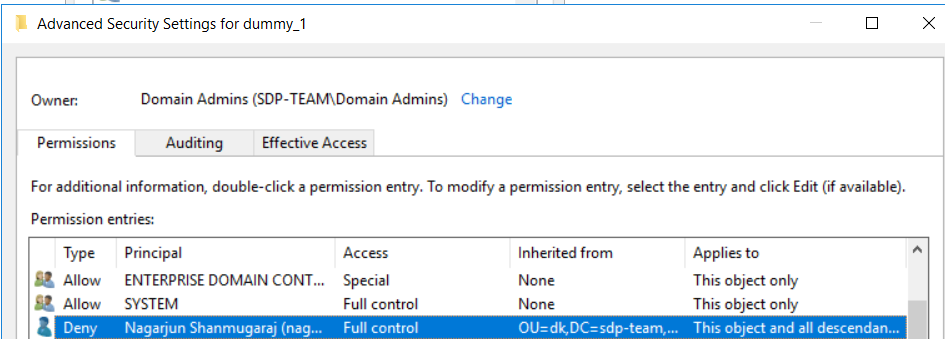
In the inherited from column, you can see where permission was inherited from.
Note: The time taken for a permission entry to be inherited can vary depending on the number of children present under a particular parent.
Verify the working of deny read permission configuration:
For checking whether I have correctly denied read permission and that read permission is applied to all the child objects, I am going to use the manual user import feature in our application.
1. I am going to try importing users under the "dk" OU and "dummy_1" OU, one from each OU.
"dk" is a user present under the dk OU and dummy_1_user is a user present under the dummy_1 OU.
2. The import is failing for both of the users that means I have correctly configured the deny read permission and the users should be deleted in next deleted user sync.
Note: while entering the login name for manual user import, make sure to enter the correct login name and do not press enter at the end of a login name because user import can fail for these reasons too.
3. If you are able import users from the OUs even after denying read permissions as explained previously then there is a good chance, your service account has an explicit read permission on the OUs. In my case I faced issues with dummy_2 OU. A security group that my service account is member of had an explicit read permission on the OU because of that I was able to import users from the OU.
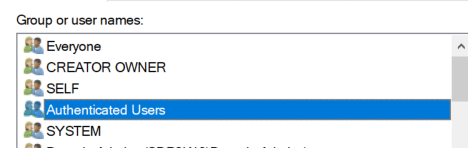
3. If you are able import users from the OUs even after denying read permissions as explained previously then there is a good chance, your service account has an explicit read permission on the OUs. In my case I faced issues with dummy_2 OU. A security group that my service account is member of had an explicit read permission on the OU because of that I was able to import users from the OU.
The group pointed out in the image was automatically added to the dummy_2 OU when it was created and an allow read permission was set on it by default. After removing this
group permission entry, the permission setting started working correctly, I wasn't able to import the users present inside dummy_2 OU.
This Authenticated Users is a default group in active directory. Every user in the Active Directory is a member of the group.