How to enable notification for EventLog Analyzer service downtime
Objective
EventLog Analyzer includes a built-in mechanism to notify administrators when the application service unexpectedly stops or crashes. This helps ensure that service interruptions are identified and addressed promptly. This document provides step-by-step instruction on how to enable notification for EventLog Analyzer service downtime.
How the notification works
When the EventLog Analyzer service goes down (due to a crash or manual stop), the system will trigger an automated email alert. This allows IT administrators to take immediate recovery action.
Prerequisites
- Ensure email server (SMTP) settings are properly configured. To check this, navigate to Settings > Admin Settings > Notification > Mail Settings.
Steps to follow
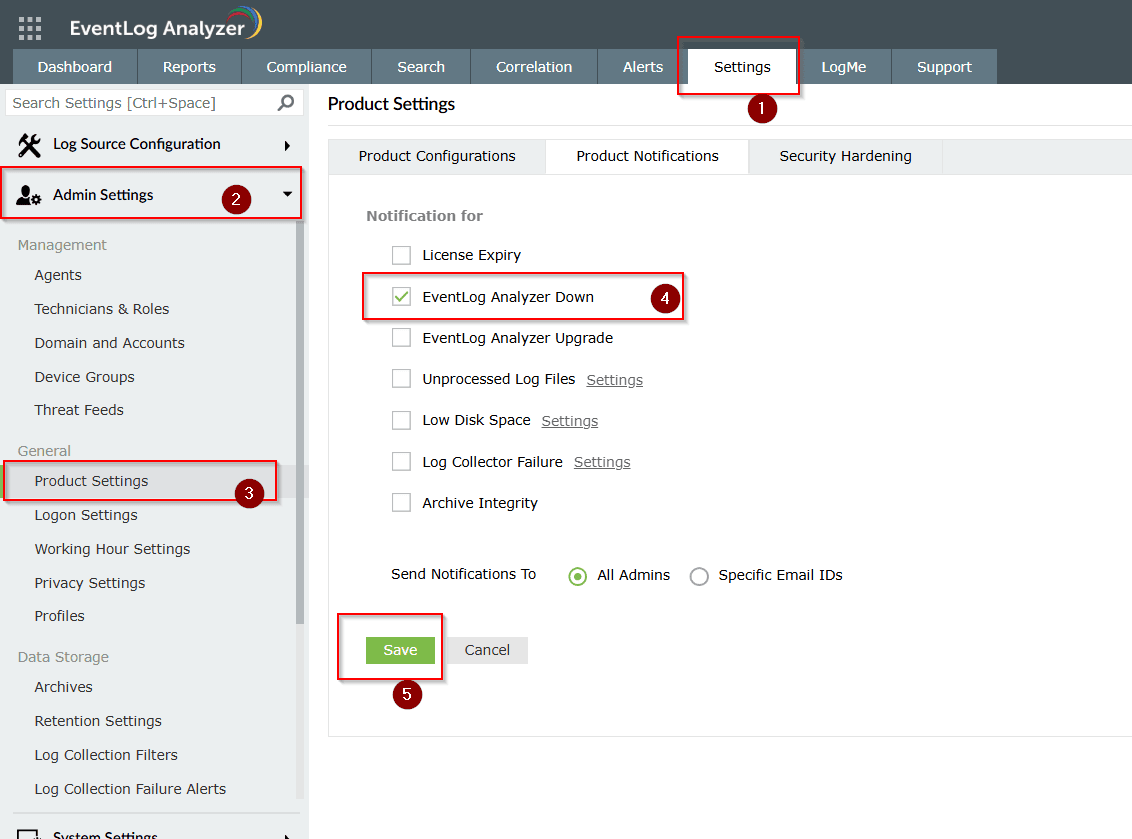
Step 1: Navigate to Settings > Admin Settings > Product Settings > Product Notification.
Step 2: Enable the Notify when EventLog Analyzer stops or crashes checkbox.
Step 3: Enter the recipient email address(es).
Step 4: Click Save to apply the settings.
Tips
- Notifications are triggered as soon as the system detects the service stoppage.
- If the system is offline or the email server is unreachable, the alert will not be sent.