[Tips & Tricks] A Custom Dashboard Widget to View All User’s Requests

[Tips & Tricks] A Custom Dashboard Widget to View All User’s Requests

One of our Community users came up with the following requirement. Most of the users in her organization had problems in finding the page to see all their requests. She requested for a widget in the dashboard to display few request filter which is most commonly used in her environment like, "All My Requests", "My Closed Requests", "My Pending Requests". We thought writing an article on this requirement might help our community users in similar scenarios.

Solution:

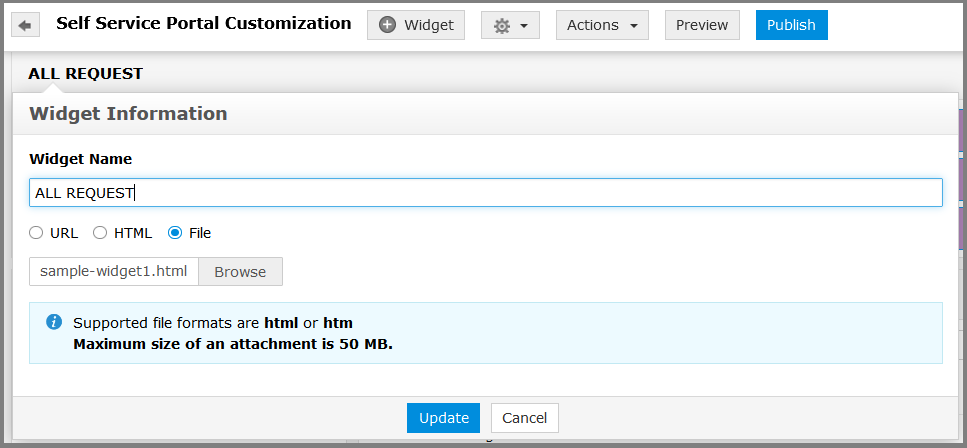
  • Login ServiceDesk Plus portal as Admin, navigate to (Admin tab >> Self-Service Portal Settings >> Customization ) Add a Widget, provide the widget name. Pick the File (radio button) browse and add the sample widget.html file attached with this post. Update and Publish the new widget.

         Note: Download the attachment and rename the file as sample widget.html


  • Login ServiceDesk Plus portal as a user, navigate to the Home tab and you will notice the new widget added. 
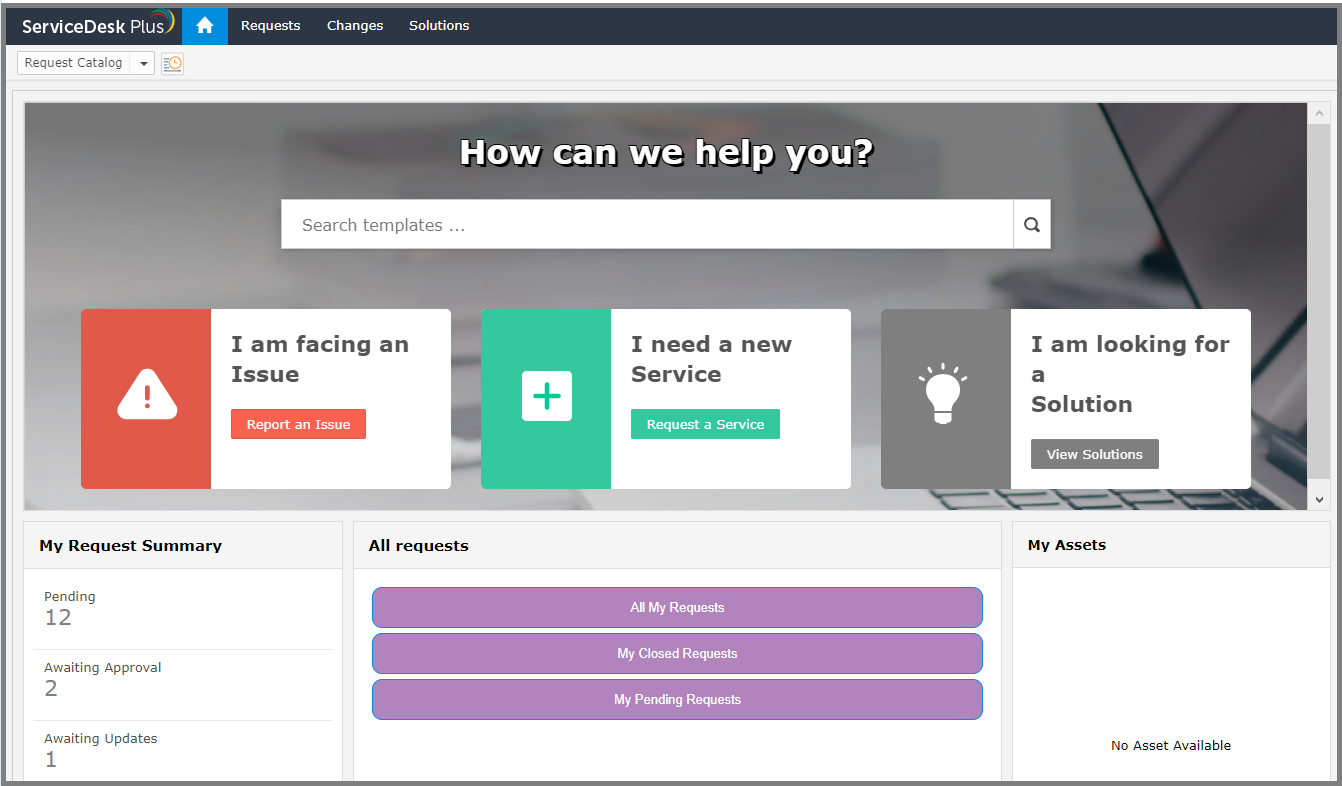


  • On clicking, each button in the widget will take the user to the appropriate request page.  

Thank you for your time, I hope you find this article useful!

Our previous article was on - Setting up Zia reopen to manage completed requests


      • Sticky Posts

      • [Tips & Tricks] Sending out custom notifications made easy.

        Hello Folks, As a part of Request management, e-mail notifications help us notify users on important occurrences in a request. ServiceDesk Plus has default email notifications however we cannot have these notifications sent based on conditions. You might even need these notifications to go to a bunch of users. I hope this post helps you achieve this in the simplest way. In earlier versions, script-based custom triggers provided flexibility to send out custom notifications based on conditions. With
      • [Tips & Tricks] Share requests to make your helpdesk process simpler and help your technicians be more efficient

        Hello folks, HelpDesk technicians involve handling different kind of issues everyday. Most of the times, a request needs to be handled by different groups. For example, when a user reports a laptop issue, it could be an issue with hardware or software and so on. Unarguably, this request has to be worked on a collaborative effort and this can be very beneficial for technicians and for users as well. As the title suggests, ServiceDesk Plus has a feature that allows technicians to share requests with
      • [Tips & Tricks] Event & Task Reminders from ServiceDesk

        Hello folks, How often does your technicians forget a task/event? From a business perspective, missing them cannot be overlooked. Most of us use reminder apps to remind us on attending an event, work on a task and so on.  ServiceDesk Plus provides you with the option of tracking your events/tasks by adding reminders within the application. It can be a general reminder or reminders related to a request, change or a problem. An event reminder can be added from Quick Actions > Reminders. A reminder
      • [Tips & Tricks] How to effectively use mentions in ServiceDesk Plus

        Hello folks, As you maybe aware that comments can be added to projects, milestones and tasks (Request,Problem,Change and Project). This allows project members to communicate with each other. In one of the recent versions, we brought in the "mention" feature that allows the project members to tag the technician to share any update, ideas and so on.  This also allows the members to choose entity owners like "Project_Owner", Milestone_Owner and Task_Owner. These keywords populate only if the entity
      • [Tips & Tricks] Operational level agreement(OLA)

        Ever wondered about how to manage the agreement on delivery of services between each internal support groups of an organization? In service desk plus, post the build 11107, we have introduced the feature "Operational Level Agreements" "OLA" which provides the internal measurable metrics among the support groups that will work in tandem with the SLA of the respective services promised by the service provider to the customer. Why do we need OLA? The OLA's are generally configured to align the activities

                        New to ADSelfService Plus?