Sambacry : Remote Code Execution Vulnerability in Linux
Hi Team,
Nice to reach out amidst busy patching season. Here is yet another announcement on the new 'sambacry' vulnerability.
What is "Sambacry"?
Samba allows non-Windows operating systems, i.e. Linux Operating Systems to share network shared folders, files, and printers with Windows operating system. Samba is a Open-source software which extends SMB protocol to Linux. This runs on majority of the active Linux Operating System currently in use.
A critical 'Remote Code Execution Vulnerability' has been discovered in Samba that could allow a remote attacker to take control of an affected Linux machines.
Security Advisory from Samba
https://www.samba.org/samba/security/CVE-2017-7494.html
How to identify using Desktop Central?
Navigate to Patch Mgmt tab -> View -> All Patches -> Missing Patches tab -> select Filters -> Provide the Bulletin ID as DSA-3860-1 OR USN-3296-1 (you can also save this view for further use)
Now you would see the computers with Linux OS vulnerable to Sambacry.
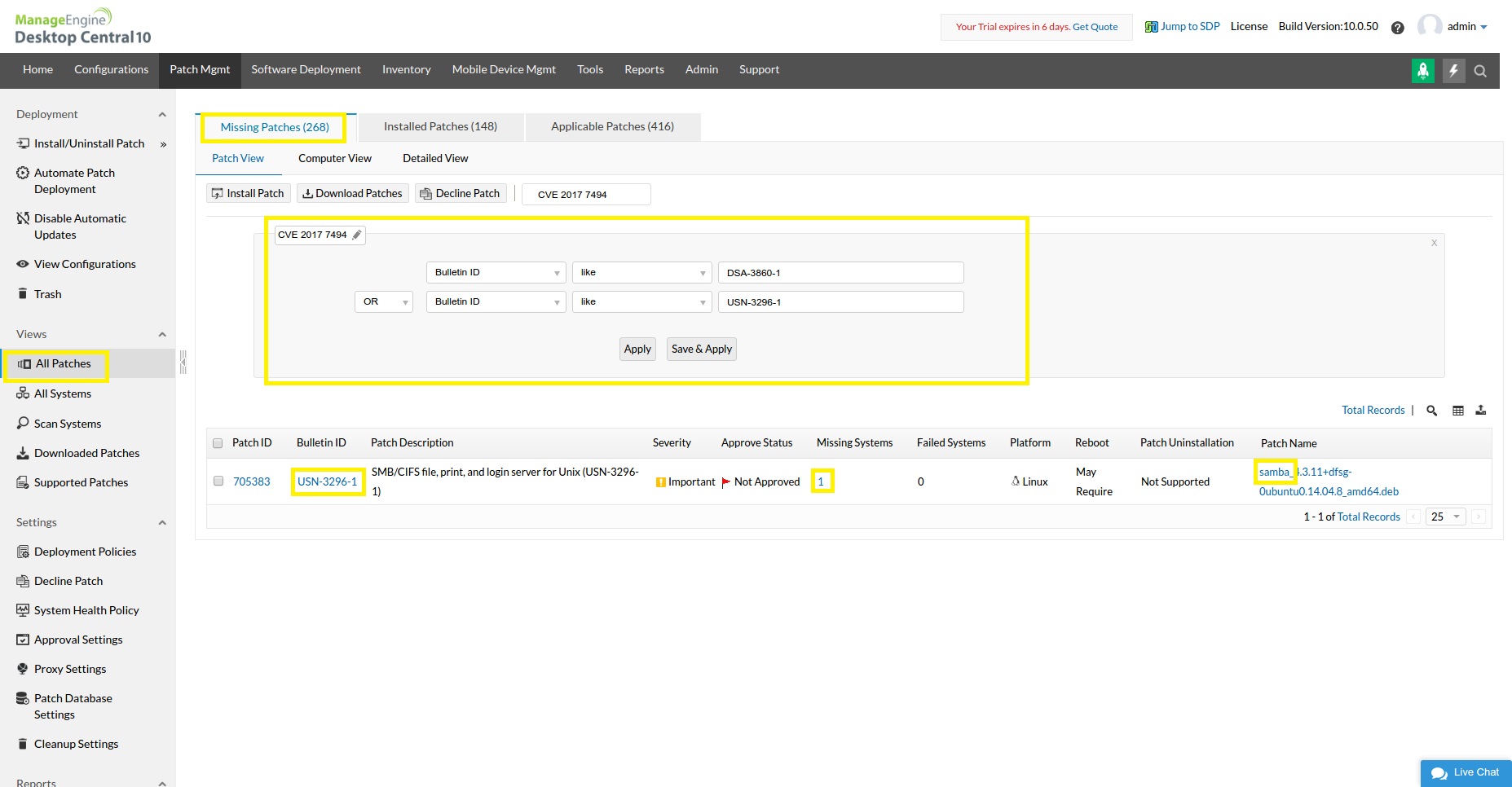
Alternatively, Here is the CVE id and relevant patch details of Ubuntu and Debian OS which is currently supported by Desktop Central.
How to deploy the fix using Desktop Central?
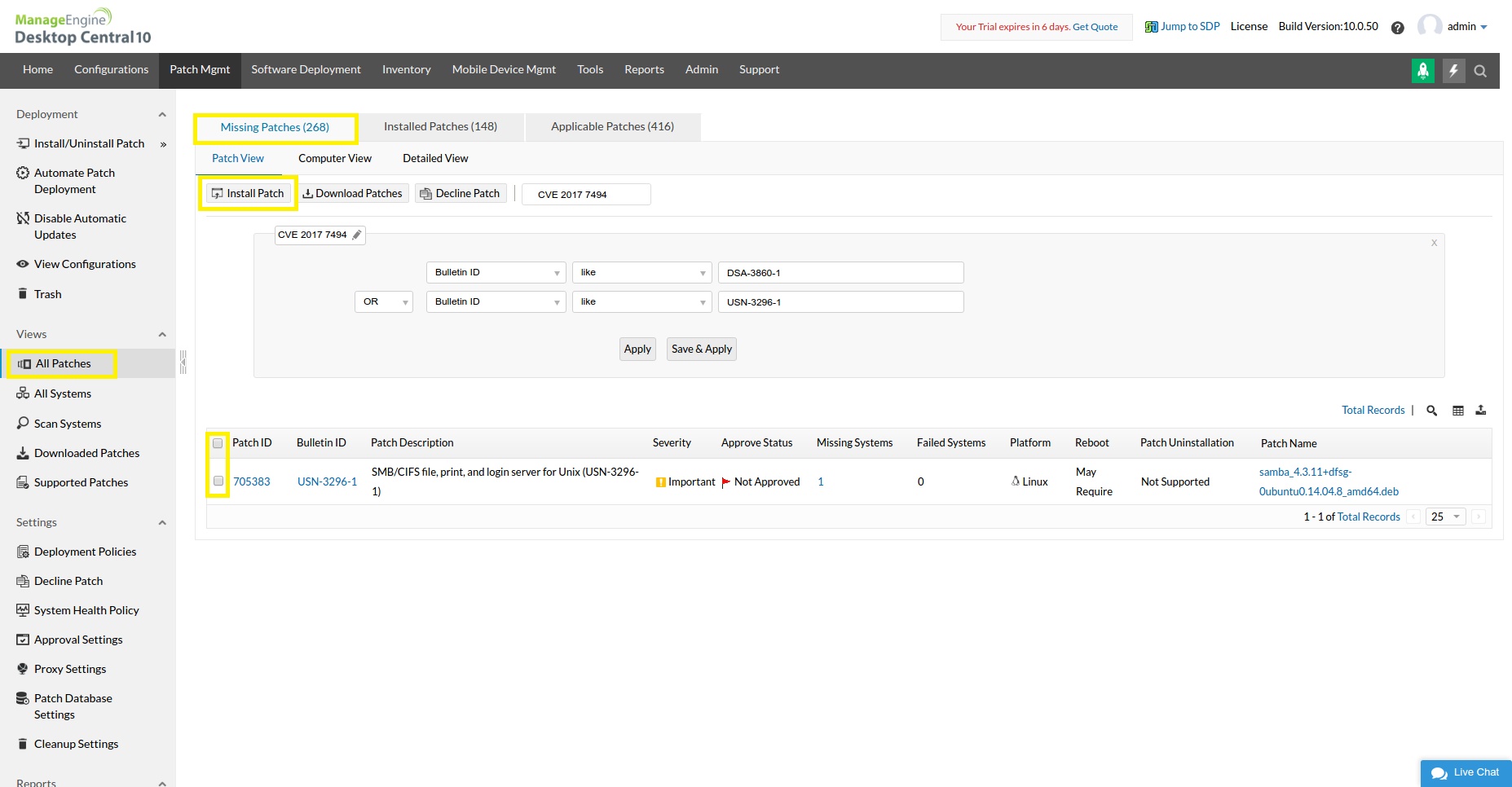
From the above navigation select the patches and click on Install Patch to deploy the patches.
How to get a Deployment status Report of your network?
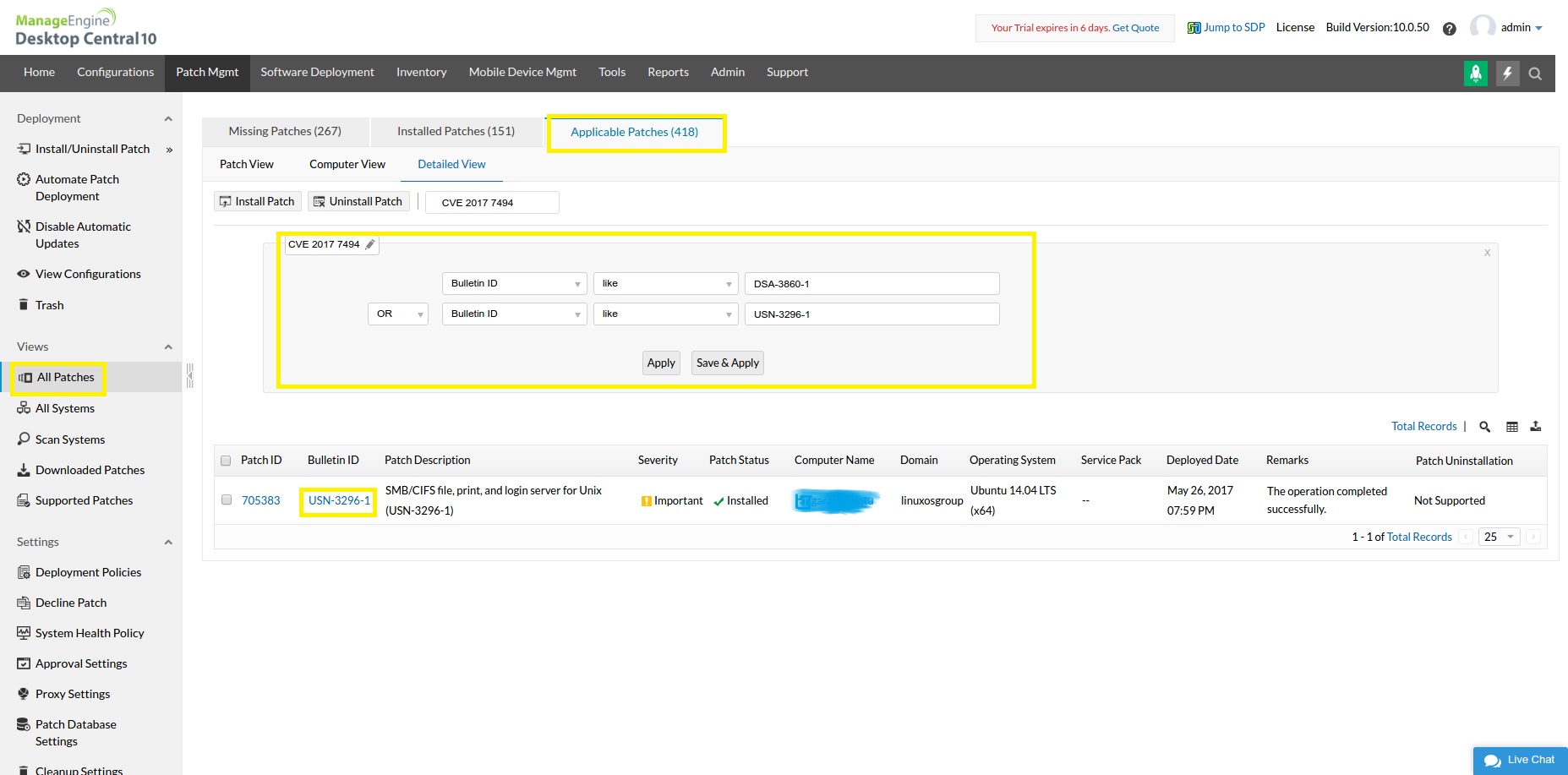
You can quickly pull a report based on the Bulletin ID.
Navigate to Patch Mgmt tab -> View -> All Patches -> Applicable Patches tab -> select Filters -> Provide the Bulletin ID as DSA-3860-1 OR USN-3296-1 (you can also save this view for further use)
You can find a report which shows the Installed and Missing patches against the computers. The report can be exported in CSV/PDF/XLSX format. Refer the below image for clarity.
Trust this helps.
Nice to reach out amidst busy patching season. Here is yet another announcement on the new 'sambacry' vulnerability.
What is "Sambacry"?
Samba allows non-Windows operating systems, i.e. Linux Operating Systems to share network shared folders, files, and printers with Windows operating system. Samba is a Open-source software which extends SMB protocol to Linux. This runs on majority of the active Linux Operating System currently in use.
A critical 'Remote Code Execution Vulnerability' has been discovered in Samba that could allow a remote attacker to take control of an affected Linux machines.
Security Advisory from Samba
https://www.samba.org/samba/security/CVE-2017-7494.html
=======================================================
== Subject: Remote code execution from a writable share.
== CVE ID#: CVE-2017-7494
== Versions: All versions of Samba from 3.5.0 onwards.
== Summary: Malicious clients can upload and cause the smbd server
== to execute a shared library from a writable share.
=======================================================
Patch Availability
------------------

A patch addressing this defect has been posted to

  http://www.samba.org/samba/security/

Additionally, Samba 4.6.4, 4.5.10 and 4.4.14 have been issued as
security releases to correct the defect. Patches against older Samba
versions are available at http://samba.org/samba/patches/.
Samba vendors and administrators running affected versions are advised to
upgrade or apply the patch as soon as possible.
How to identify using Desktop Central?
Navigate to Patch Mgmt tab -> View -> All Patches -> Missing Patches tab -> select Filters -> Provide the Bulletin ID as DSA-3860-1 OR USN-3296-1 (you can also save this view for further use)
Now you would see the computers with Linux OS vulnerable to Sambacry.
Alternatively, Here is the CVE id and relevant patch details of Ubuntu and Debian OS which is currently supported by Desktop Central.
CVE ID: CVE-2017-7494
Ubuntu - Bulletin: USN-3296-1 and USN-3296-2
Patch Versions :
* Only for Ubuntu 12.04 ESM subscribers
- Ubuntu 17.04: 2:4.5.8+dfsg-0ubuntu0.17.04.2
- Ubuntu 16.10: 2:4.4.5+dfsg-2ubuntu5.6
- Ubuntu 16.04: 2:4.3.11+dfsg-0ubuntu0.16.04.7
- Ubuntu 14.04: 2:4.3.11+dfsg-0ubuntu0.14.04.8
- *Ubuntu 12.04: 2:3.6.25-0ubuntu0.12.04.11
Debian - Bulletin: DSA-3860-1
Patch Versions:
- Debian 8: 2:4.2.14+dfsg-0+deb8u6
- Debian 7: 2:3.6.6-6+deb7u13
How to deploy the fix using Desktop Central?
From the above navigation select the patches and click on Install Patch to deploy the patches.
How to get a Deployment status Report of your network?
You can quickly pull a report based on the Bulletin ID.
Navigate to Patch Mgmt tab -> View -> All Patches -> Applicable Patches tab -> select Filters -> Provide the Bulletin ID as DSA-3860-1 OR USN-3296-1 (you can also save this view for further use)
You can find a report which shows the Installed and Missing patches against the computers. The report can be exported in CSV/PDF/XLSX format. Refer the below image for clarity.
Trust this helps.
Regards,
-----
R Romanus Prabhu
Technical Account Manager
Desktop and Mobile Device Management Solution
Direct Support : +1 408 916 9886
Toll Free: +1 888 720 9500 (US) | 0800 028 6590 (UK) | +1 800 631 268 (AUS)
[ Desktop Management | Desktop Mgmt for MSP | OS Deployment | Mobile Device Mgmt | SCCM 3rd Party Patch Mgmt | Patch Manager Plus ]
Topic Participants
Romanus Prabhu Raymond