If $ RequestLink is set in the URL when creating a new reply template, it will be changed to the URL of "http: // $ requestLink" without permission.
Hi,
We want to use $RequestLink when creating a new reply template, but if you set the hyperlink for $RequestLink, it becomes as follows.
1. Place the variable $RequestLink in the template.
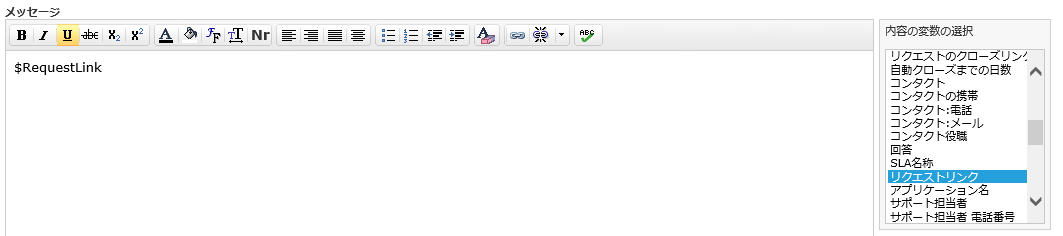
2. Set the hyperlink as follows for the $RequestLink you placed in step 1.
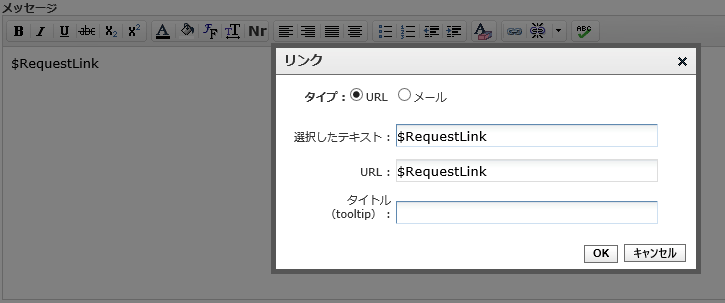
3. If you try to edit a hyperlink for the $RequestLink you set in step 2, it will be changed to the URL " http://$requestLink/" as shown below.
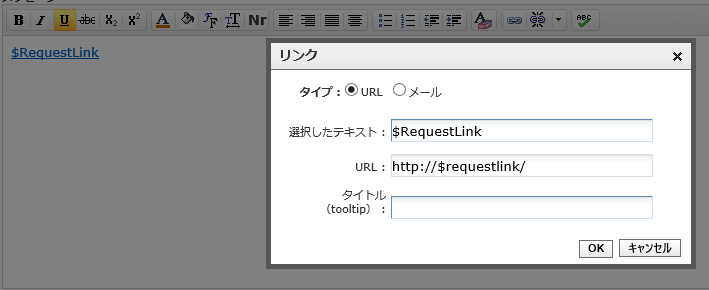
When such an event occurs, when you actually receive a mail, it becomes a link such as " http://https:// ~~~", and it will be distributed as spam mail, so the customer will be informed It is very inconvenient because it will not be attentive.
Is there any workaround?
Best Regards,
We want to use $RequestLink when creating a new reply template, but if you set the hyperlink for $RequestLink, it becomes as follows.
1. Place the variable $RequestLink in the template.
2. Set the hyperlink as follows for the $RequestLink you placed in step 1.
3. If you try to edit a hyperlink for the $RequestLink you set in step 2, it will be changed to the URL " http://$requestLink/" as shown below.
When such an event occurs, when you actually receive a mail, it becomes a link such as " http://https:// ~~~", and it will be distributed as spam mail, so the customer will be informed It is very inconvenient because it will not be attentive.
Is there any workaround?
Best Regards,
Topic Participants
Misato Kushida
Arun Kumar R