How to change the report attachment format in EventLog Analyzer

How to change the report attachment format in EventLog Analyzer

Objective

EventLog Analyzer allows you to configure how reports are attached when exported or emailed. You can choose between PDF or CSV formats, ensuring that reports are shared or stored in a format that best suits your operational and compliance needs.

Steps to follow

To configure the default report attachment format:
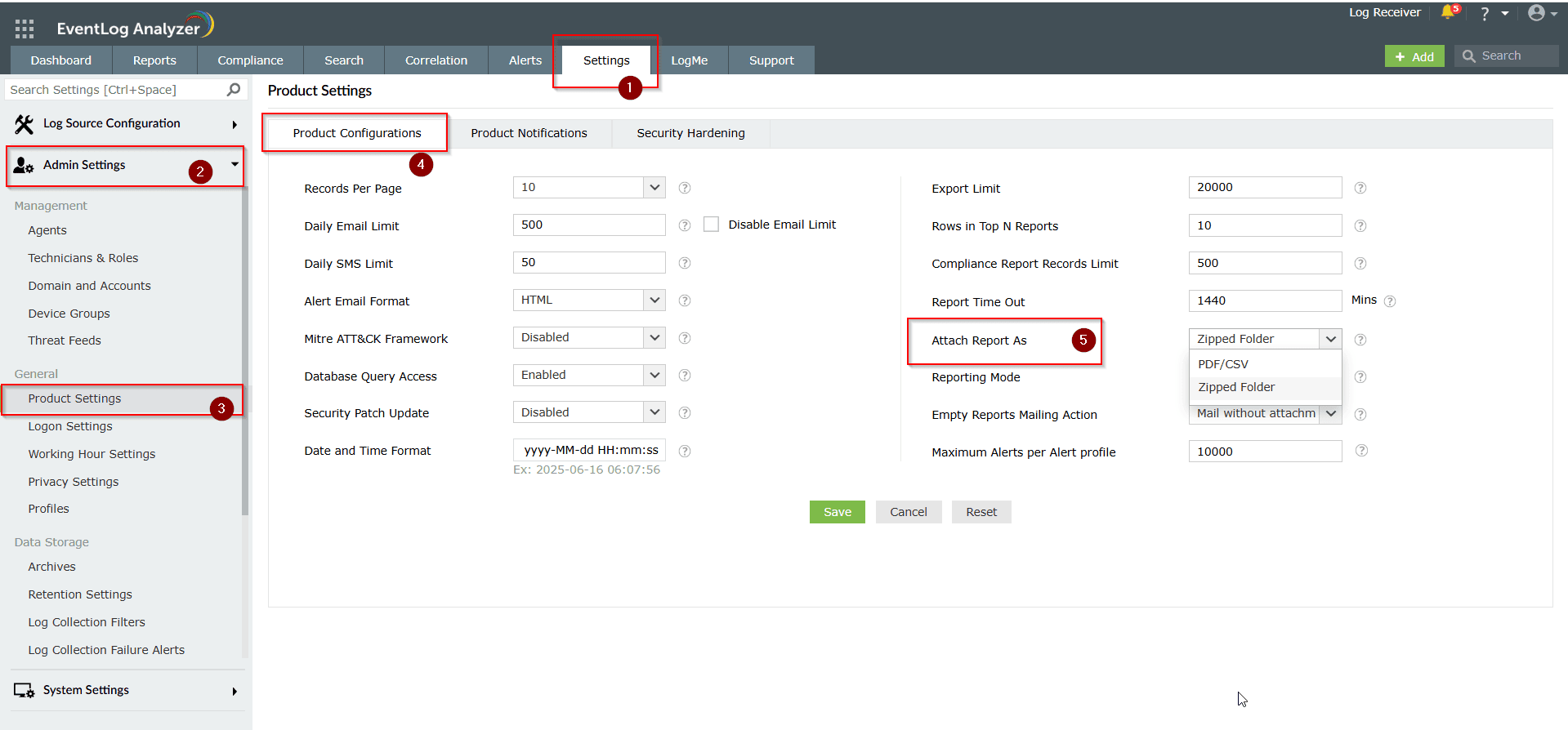
Step 1: Navigate to Settings > Admin Settings > Product Settings > Product Configuration.
Step 2: In the Attach Report As field, choose the required format: PDF/CSV or Zipped Folder.
Step 3: Click Save to apply the changes.
 

Related topics and articles


                  New to ADSelfService Plus?

                    • Related Articles

                    • How to configure report mode for scheduled reports in EventLog Analyzer

                      Objective Automate the delivery of scheduled reports in EventLog Analyzer by configuring the desired reporting mode. You can choose to send the report via email, save it to a file location, or both—helping ensure flexible and timely distribution with ...
                    • How to create a custom report view in EventLog Analyzer

                      Objective EventLog Analyzer allows you to create multiple views of the same report. This enables you to view the report based on different parameters such as time, domain, source, etc. The different views will be generated from the same set of log ...
                    • Introduction to EventLog Analyzer

                      What is log management?  An enterprise network consists of different entities—perimeter devices, workstations, servers, applications, and more. Each entity records every activity that unfolds within it in the form of logs. These logs hold information ...
                    • How to modify the compliance report record limit in EventLog Analyzer

                      Objective EventLog Analyzer offers predefined compliance reports to help meet regulatory requirements such as the PCI DSS, HIPAA, and the GDPR. By default, these reports display a maximum of 500 records to ensure quick access and a smooth user ...
                    • How to schedule a report in EventLog Analyzer

                      Objective EventLog Analyzer enables you to automate the generation and delivery of reports through its Scheduled Reports feature. This helps ensure timely access to log insights without manual intervention. Reports can be scheduled at predefined ...