Upcoming enhancements on Fine-Grained , Global & Individual Report Settings, SLA Breach Prediction, AI Insights in Request Details page and SharePoint Integration for Ask Zia in ServiceDesk Plus Cloud
Dear Users,
We’re pleased to share an important announcement about the upcoming enhancements on Fine-Grained Report Settings, Global Report Settings, Individual Report Settings (Tabular and Matrix Reports Only), SLA Breach Prediction by Zia, AI Insights in Request Details page and SharePoint Integration for Ask Zia in ServiceDesk Plus Cloud.
Below is a brief run-through of the same.
Enhancements
Fine-Grained Report Settings
Report settings can now be configured at two levels: global and individual report. This ensures consistency and precise control over reports.
Global Report Settings:
- Global report settings apply to all reports by default. Note that only SDAdmins can configure them.
- The following fields are introduced:
Field | Description |
Multiline Field Length Limit | Set the maximum character length for rich text fields in reports. |
Exclude report header in exported files | Hide headers in specific report exports and scheduled reports. |
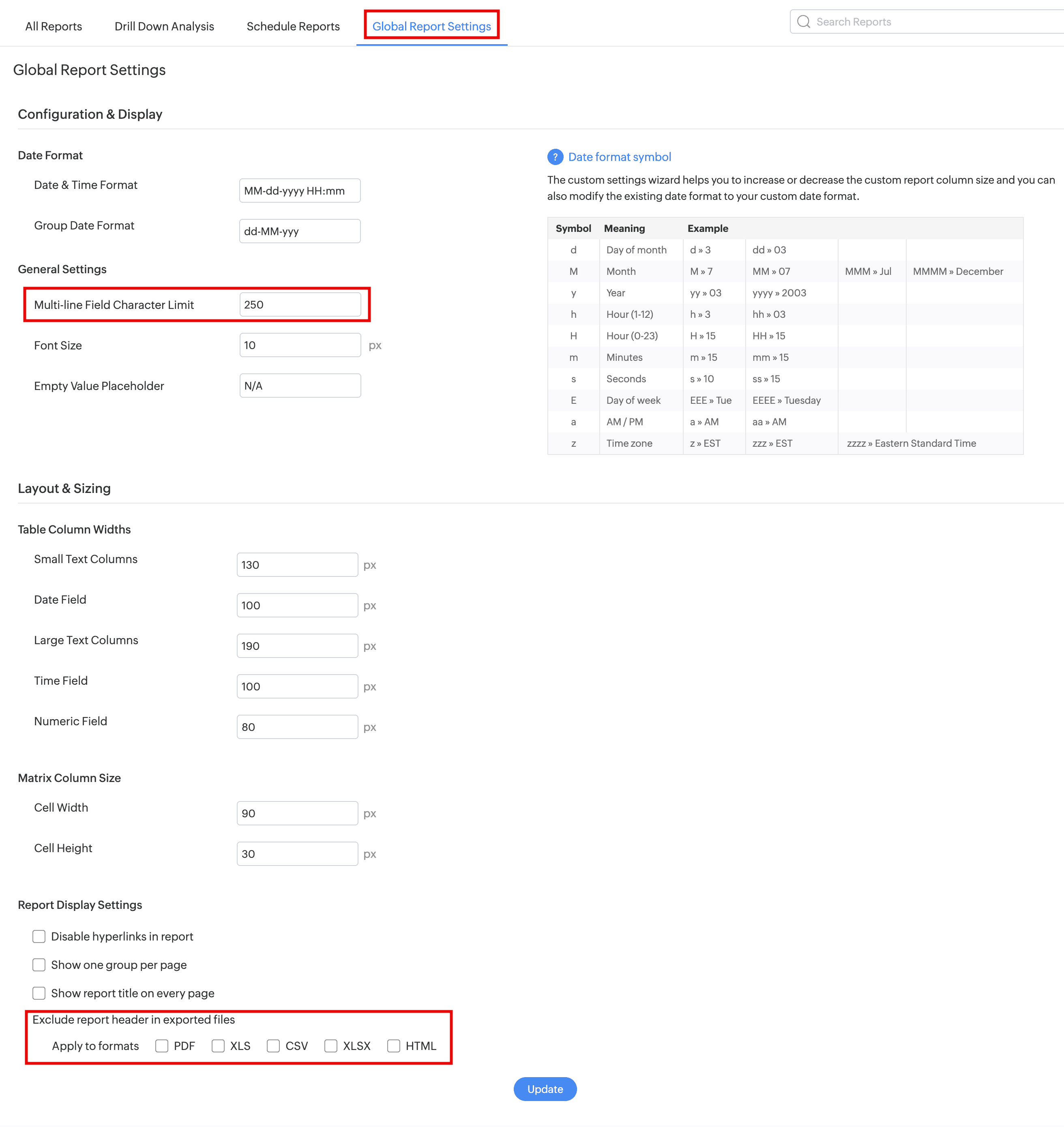
Individual Report Settings (Tabular and Matrix Reports Only)
- Users with SDReport and Update Report permissions can personalize display settings for each report individually under Report Settings in the report wizard.
- They can choose between global and personalized settings but cannot edit the global ones

Scheduled Reports Enhancement
- In scheduled reports configuration, a new Skip sending email if report has no data option is introduced. Enabling this option will not trigger email notifications if the scheduled report has no data

Behavior Changes
- Report Settings is now renamed as Global Report Settings and restricted to SDAdmins only.

SLA Breach Prediction by Zia
- Zia now predicts potential SLA breaches for new requests and when the subject, description, site, or SLA of an existing request is updated. The prediction is based on historical request data, including the subject, description, and past average elapsed time of similar requests.
- Zia assigns a confidence level to each prediction to help technicians identify high-risk requests and prioritize actions.
- To enable SLA Breach Prediction, go to Setup > Zia > Artificial Intelligence > Predictive Features.

- Technicians can now view prediction confidence levels under AI Insights in the request details page right pane and in the request list view to prioritize actions and improve SLA compliance.


SLA Breach Prediction Notifications
- Administrators can now configure a confidence level threshold to identify potential SLA breaches and select users to notify when the prediction confidence level meets or exceeds the configured threshold.

- To configure SLA Breach Prediction notifications, go to Setup > Automation > Notification Rules > Request and enable SLA Breach Prediction.

AI Insights in Request Details page
- AI Insights is now available in the right pane of the request details page and displays AI-driven insights for each request, including Sentiment Analysis and SLA Breach Prediction.

You can show or hide AI Insights section by customizing the technician layout from Setup > Layouts > Details Page Layout > Technician Layout Customization > Customize. To learn more, click here.

Behavior Changes
- The Sentiment Analysis section is now available under AI Insights in the right pane of the request details page instead of Associations.
- SLA Breach Prediction is available in the US, EU, and IN data centers.
- Resolution assist using similar requests is now available for the IN data center, in addition to the US and EU data centers, for all editions.
SharePoint Integration for Ask Zia
- Ask Zia can now answer questions by using Microsoft SharePoint documents you can access.
- Enable the integration under Admin > Integrations > Third-Party Integrations.
- Ask Zia supports SharePoint files in PDF, DOCX, DOC, MD, TXT, HTML, and HTM formats, up to 5 MB per file

Note : All upgrades and feature releases, will be in-service and there won't be any downtime or service interruption.
Stay tuned for more updates!!! We will update here once these upgrades are unwrapped in live
Please share your thoughts/queries/feedback.
Thanks and regards,
A N Nithish Kumar
ServiceDesk Plus Cloud