Upcoming enhancements in Zia Cluster Analysis, Google AI Studio integration, multi-language solutions & Ask Zia as the default requester landing page in ServiceDesk Plus Cloud.
Dear Users,
We’re pleased to share an important announcement about the upcoming enhancements on tasks and Help center in ServiceDesk Plus Cloud.
Below is a brief run-through of the same.
Enhancements
Zia Cluster Analysis
- Introducing Cluster Analysis to identify and manage incidents efficiently. This AI-powered feature groups related requests into clusters based on selected request fields, enabling faster pattern recognition and proactive issue management.
- Administrators can create and manage multiple configurations, define grouping criteria and fields, and configure threshold-based actions such as notifications to stay informed when incident trends emerge.
- To configure Zia Cluster Analysis, go to Setup > Artificial Intelligence > Cluster Analysis.
- A dedicated analysis page provides a centralized view of clustered data, enabling technicians to understand patterns and perform actions such as linking requests or associating problems directly from the interface.
- To view the analysis, go to Zia > Cluster Analysis from the request list view or the request details view.

Zia-Powered Collaborator Suggestion
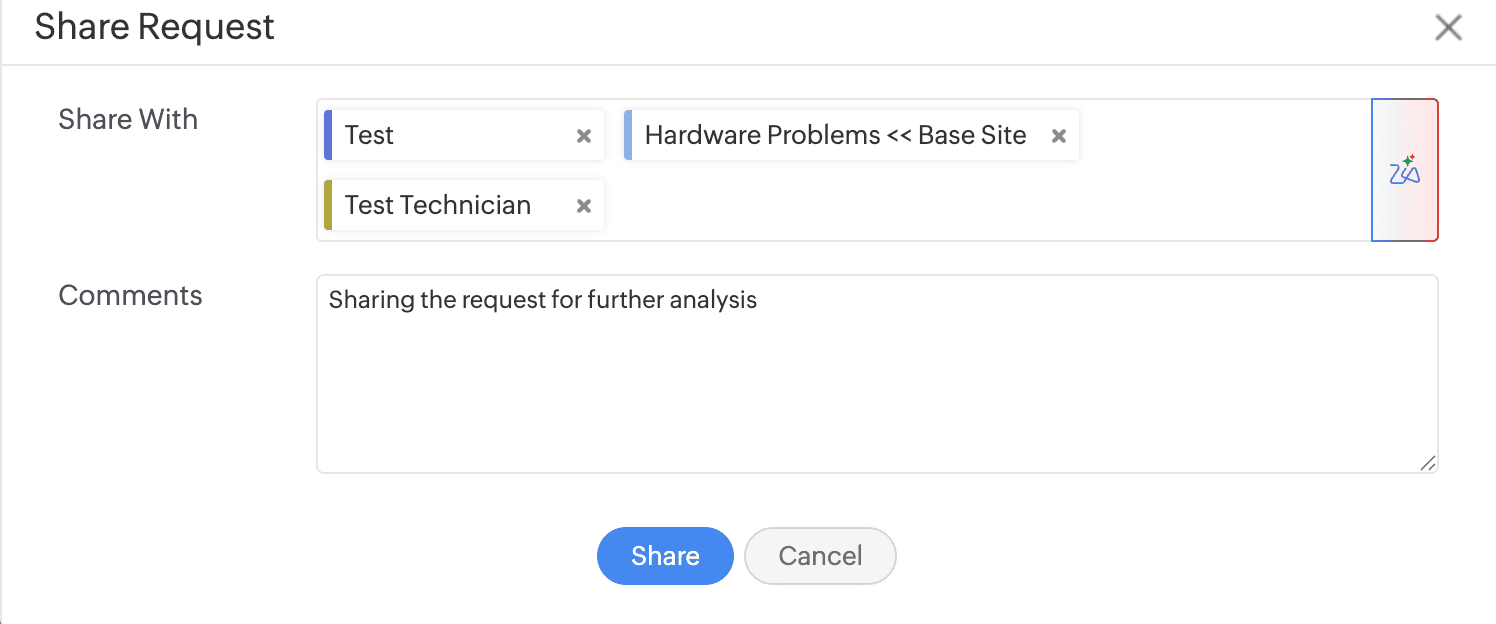
- Zia now predicts and suggests relevant technicians, requesters, and technician groups when sharing requests, enabling faster collaboration and more efficient request handling.
- To predict shared users, enable Collaborator Suggestion from Setup > Zia > Artificial Intelligence > Predictive Features.
Google AI Studio Integration
- Integrate ServiceDesk Plus Cloud and Google AI Studio and enhance efficiency and improve productivity.
- To enable the integration, go to Setup > Apps & Add-ons > Integrations > Third Party Integrations > Google AI Studio.

- To enable the GenAI features, go to Setup > Zia > Artificial Intelligence > GenAI Features.

Ask Zia
- Ask Zia (Zoho-hosted LLM) is now extended to other editions in addition to the Enterprise edition.
Solution Assist
- Solution Assist is also available in all editions.
RAG Attachment Support
- RAG-based solution prediction now supports attachment processing. It analyzes and indexes solution content along with associated files, including documents and other supported file formats such as PDF, DOCX, DOC, MD, TXT, HTML, and HTM.
Generate Multi-Language Solutions
- Translate AI-generated knowledge base articles into multiple languages by using Language in the Solution Generator pop-up. By default, the solution is generated in the language used in the prompt

Set Ask Zia as Default Landing Page for Requesters
- Administrators can set Ask Zia as the default landing page in the requester portal by enabling Set Ask Zia as the default landing page under Setup > General Settings > Requester Portal > Requester Portal Settings.

Behavior Changes
Set Ask Zia as Default Landing Page for Requesters
- Reordering of Ask Zia in the requester navigation menu is now restricted.

Note : All upgrades and feature releases, will be in-service and there won't be any downtime or service interruption.
Stay tuned for more updates!!! We will update here once these upgrades are unwrapped in live
Please share your thoughts/queries/feedback.
Thanks and regards,
A N Nithish Kumar
ServiceDesk Plus Cloud