Understanding Archiving in ServiceDesk Plus
We've been working with a number of clients recently that have a significant number of historical requests in their ManageEngine ServiceDesk Plus installations. Whilst this is not a major issue it can cause performance issues when searching and filtering data with a very large number of requests.
In order to combat this issue we recommended the configuration of the Request Archiving features in ServiceDesk Plus. This is easily done from Admin > Data Archiving:
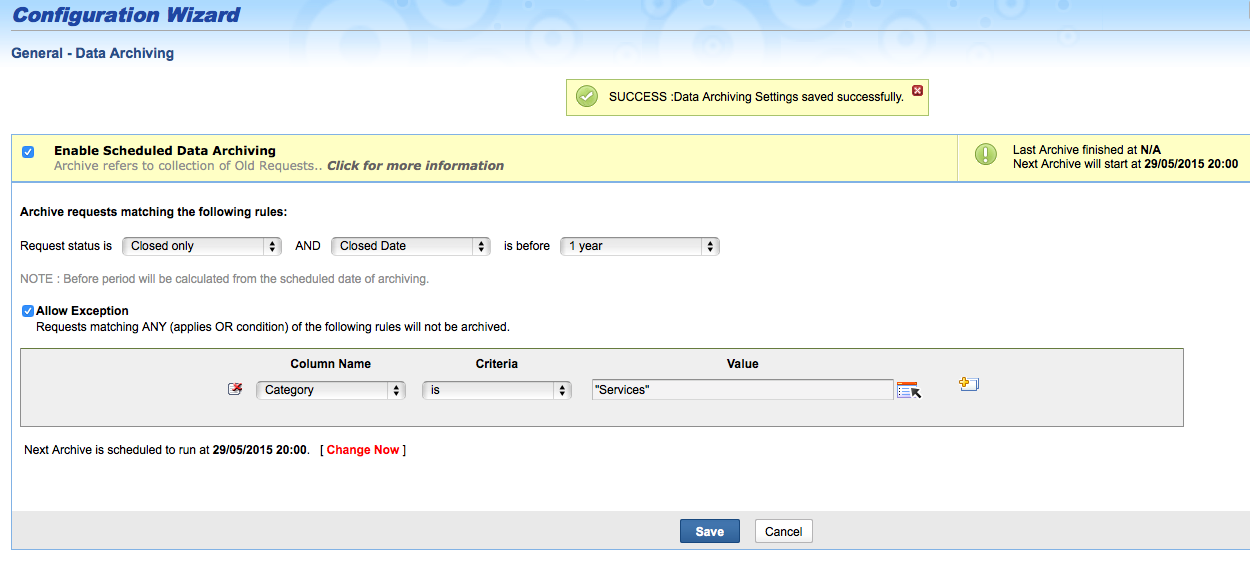
A number of options exist to allow you to decide which of your historical requests you would like to archive from the active request queues. In this example we have set to archive all Closed requests that have a Closed Date greater than one year old:

In addition to the general archive conditions you can also specify exceptions to maintain a series of requests in the main request queues. In the following example we have elected to omit only requests that have a Category of 'Services' (multiple criteria could be set):

Finally you configure the schedule for the archiving to take place:

To view and search the archived requests go to the archive view from the Requests module filter drop down:


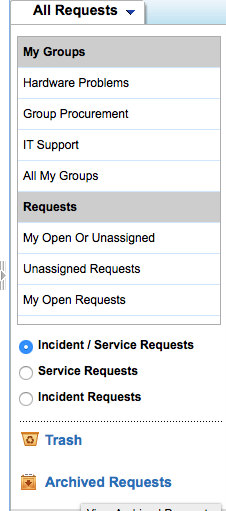
What the archive function is doing is to move the requests to an archive table in the main database so that they are not part of the normal, active request queues. It is important to note:
- The archived requests cannot be modified, deleted or moved back to the active state.
- Any reply to an already archived request will be added as a new request and not as a thread to the existing archived request.
The important thing to remember here is that the requests
still exist in the database so archiving will not dramatically reduce the size of your ServiceDesk Plus database.
If you're looking to reduce the size of your database overall you would need to actually delete any requests that are no longer needed:
We hope you find this useful
set3 Solutions
ManageEngine Partner