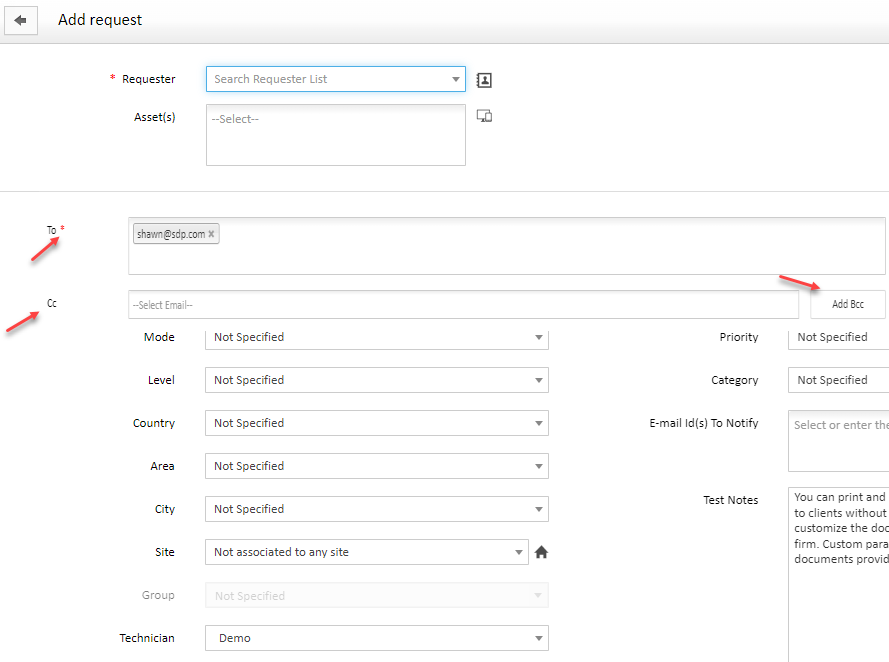
To, CC, BCC fields when creating a New Request!
When a request is created, it is very good if there are To, CC, BCC fields in it.
Where is this feature used?
- When the user wants to notify several people.
- When the technician wants to leave a response on the user's request, that response will be automatically sent to the people specified by the user for notification in the request form.
This feature can be much better than E-mail Id(s) To Notify field act Because the specified person will be notified of all the responses of the IT Dept.
Adding functionality can enhance information based on RACI matrix (informed!)
Sticky Posts
Upgrading to ServiceDesk Plus 15100: Important Information
We are pleased to announce that the 15100 patch file for ServiceDesk Plus is now made available to our customers. To ensure a smooth transition, we conduct a thorough sanity check on each customer's ServiceDesk Plus setup before providing the patch. IfManageEngine Supportcenter Plus - version 14.8 - Build - 14830 is available
Dear User(s) Greetings for the day. We released Supportcenter Plus - version 14.8 - Build - 14830. Behaviour Changes: SCP-3505 : From this release, the customer portal will show only the latest announcements. Earlier, all announcements including the pastAbility to Assign Technician in another group from Dropdown.
We currently have an On-Prem instance with multiple groups. All of the tickets default to the Tier 1 group. Many times, the Tier 2 team forwards in tickets for themselves. It would be beneficial if you could assign multiple tickets from the Requests' Assign dropdown no matter what group the technician is in. SDP should be smart enough to automatically change the group based on what technician you select. When I select the technician I'd like to assign to, *the technician themselves* it gives me anSteps to secure MSSQL database connection
Hello folks, This post explains you the steps that need to be followed to secure the database connection in ServiceDesk Plus. How to connect secure MS SQL Server? Summary of Steps: 1. Create SSL certificate 2. Import the SSL certificate to SDP setup. 3. Enable SSL Encryption in SQL Server Step 1 & 2: To start this process, we need to create an "SSL Certificate" it could be either self-signed or third party certificate. Do follow the below steps in MSSDP SAML SSO
Hi, is possible to use SAML authentication for SSO? Your Version : 9.3 Build 9327 Thank you Jacir