Report on permissions directly assigned to users in SharePoint
SharePoint Manager Plus is a one-stop solution for SharePoint management that effectively controls access to various levels of SharePoint content. From a centralized console, you can check, grant, and edit the permissions of users and groups. The out-of-the-box reports provide visibility into your SharePoint infrastructure, making SharePoint Manager Plus the complete package.
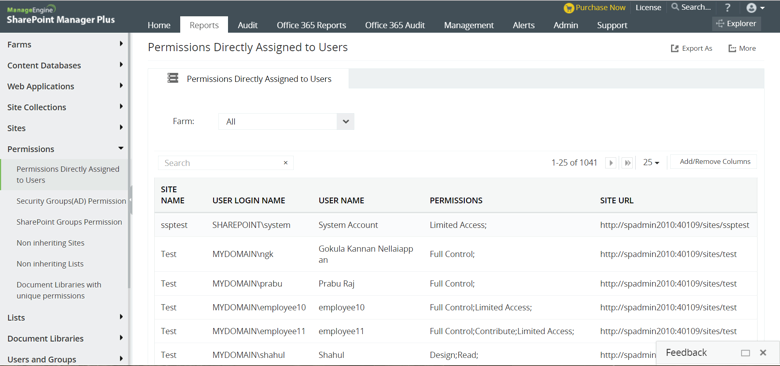
Steps to generate a report on the permissions directly assigned to users:
- Click on the "Reports" tab.
- Select the "Permissions" option in the top-left.
- Choose "Permissions directly assigned to users" from the listed categories.
- Select the farm in which you wish to perform the action. On selecting the farm, the concerned report is generated.
Sticky Posts
[KB]Permission management - How to check permissions of users or groups in SharePoint?
When permission inheritance breaks, it paves the way to make SharePoint more secure. However, it's also a hindrance to administration as it often demands you look up and ensure that each user or group has access to only what is necessary. Looking up this information in the hierarchy levels of SharePoint for each user or group is tedious. With SharePoint Manager Plus, you can bypass this by directly checking the permissions of the particular user or group you wish to look up. Steps to check permissions