Post Messages in Microsoft Teams(WorkFlows) chat using Webhooks
I am currently using ADManager Plus (Build 8033) and trying to configure a Webhook template to send notifications to an MS Teams channel via Teams Workflow(Power Automate Workflows).
The Problem:
I have a valid Power Automate URL that includes several query parameters: api-version, sp, sv, and sig.
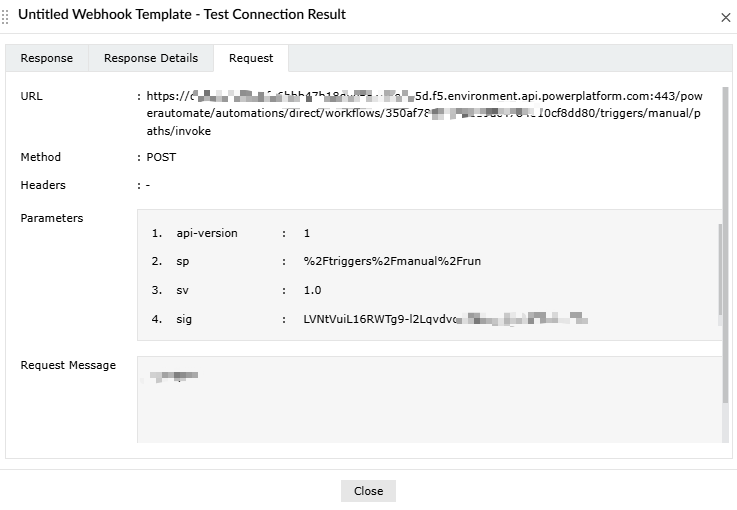
When I paste this URL into the ADMP Webhook configuration, the system automatically strips these parameters from the URL and moves them into the "Parameters" section.
When I click "Test and Save", the request fails with the following error:
Response Status: FAILURE
Response Code: 401
Response Message: Unauthorized
What I have tried:
I noticed that the sp value (e.g., %2Ftriggers%2F...) contains percent signs. Since ADMP uses % for macros, I tried escaping it to %%2Ftriggers%%2F... to prevent the system from misinterpreting it.
However, even after escaping the characters, the test result remains 401 Unauthorized.
It seems the way ADMP reconstructs the URL or handles the signature (sig) parameter is breaking the authentication required by Microsoft Power Automate.
Questions:
How can I prevent ADMP from automatically splitting the URL into the "Parameters" section?
Is there a specific way to format the sig and sp parameters to ensure they are passed exactly as they appear in the original URL?
I have attached screenshots of my current configuration and the error messages for reference. Any help would be greatly appreciated.