[KB] Office 365 Group Membership Management
Groups are an easy way to send emails or assign permissions to users collectively. When new employees join your organization, all you have to do is add them to appropriate groups to grant them access to the required resources. Most of the time there will be multiple groups to which the new users must be added. But, the Office 365 portal does not have a provision to add users to multiple groups in one go. And, that's why you need a comprehensive Office 365 management solution that can fill in all the missing gaps of native Office 365.
Group Membership Management with Office 365
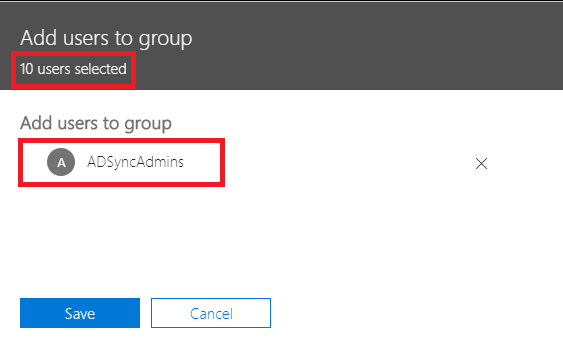
As shown in the image below, in the Office 365 portal, users cannot be added to more than one group at a time. Let's now see how O365 Manager Plus, a comprehensive Office 365 management, reporting, and auditing solution can resolve this challenge easily.
Group Membership Management with O365 Manager Plus
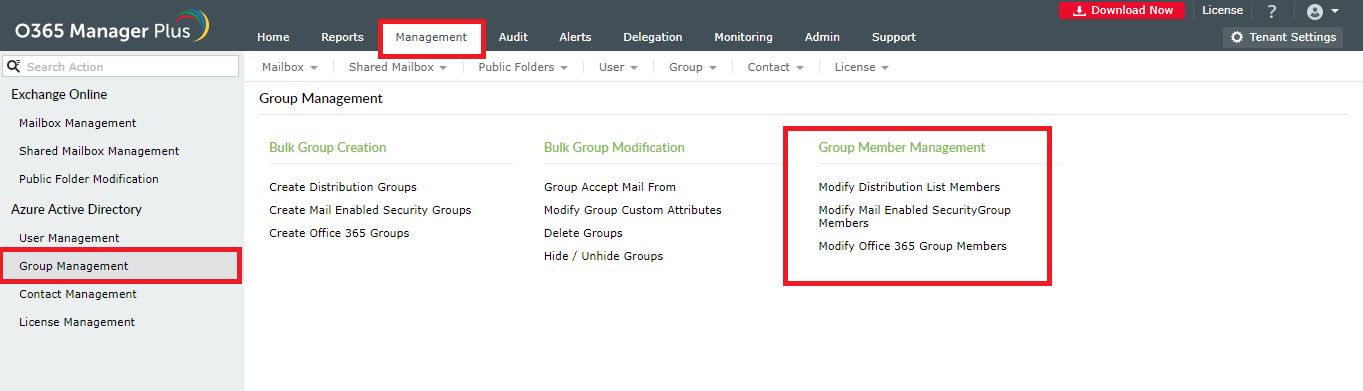
O365 Manager Plus provides you with three separate tasks to manage the members of distribution lists, mail-enabled security groups, and Office 365 groups respectively. The tasks can be found in the solution's web-console under Group Management category in the Management tab.
With O365 Manager Plus you can,
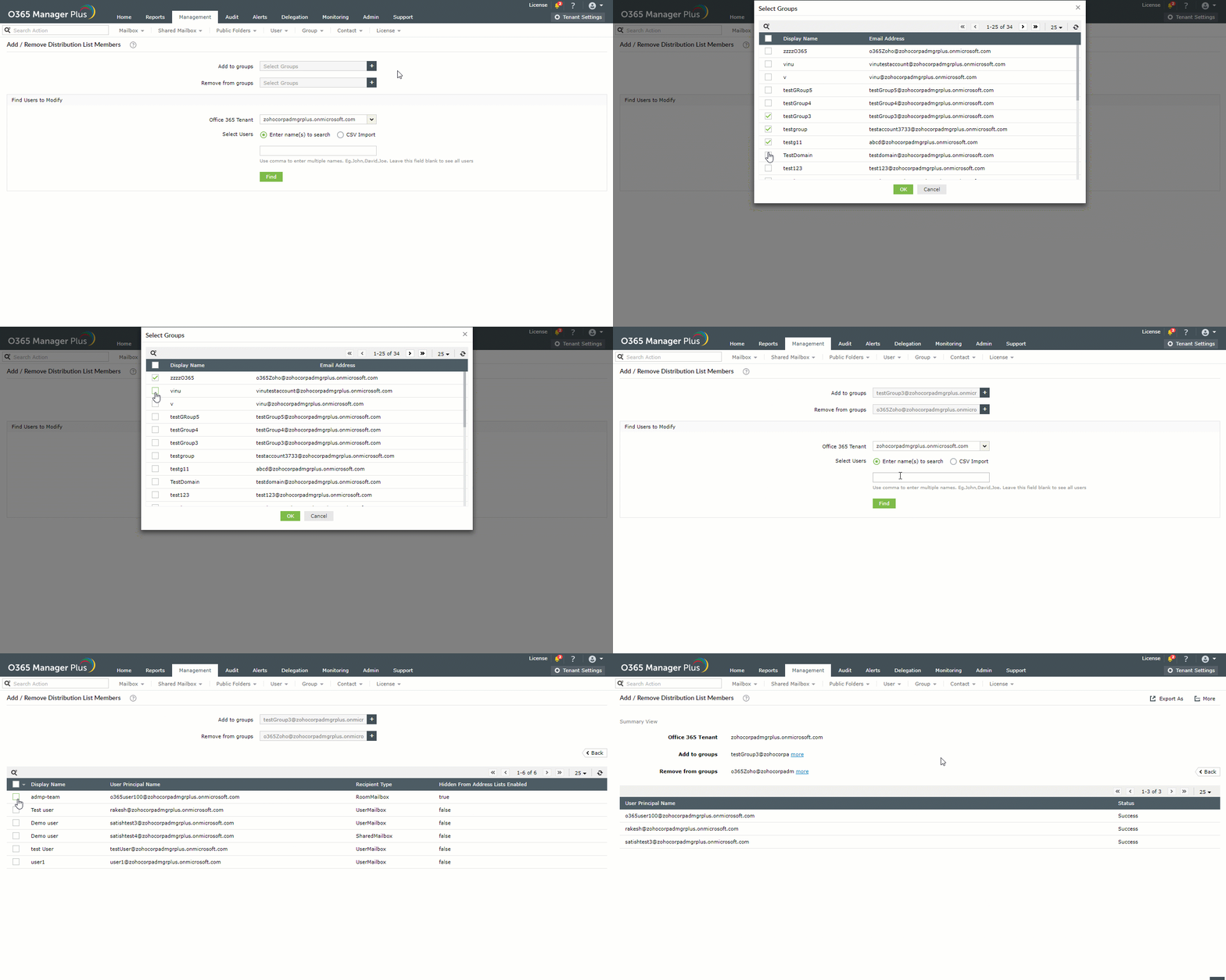
It must be clear from the above explanation that the entire process of adding or removing users from groups can be done in a few clicks without much hassle with O365 Manager Plus.
Click here to know more bout O365 Manager Plus.
Sticky Posts
[KB] Manage Microsoft Teams with O365 Manager Plus
Just released earlier this year, Microsoft Teams a chat-based workspace in Office 365 is the latest collaboration tool from Microsoft. With Microsoft Teams, you can exchange messages and share files of any type. Though it may sound attractive, that file sharing feature turns ugly when highly confidential or malicious files are shared by accident or on purpose. In addition to Teams, third-party applications being integrated with Teams must also be monitored for obvious security reasons.Thankfully,[KB] Office 365 Auditing : 4 activities that you should never miss
Office 365 auditing is an effective way to get insights about user activities, and insider threats. Among the plethora of activities to be audited, there are four must-audit activities, that help you to identify the most common attacks like, brute-force attack, insider attack, elevation of privilege attack, etc. Below are those four important activities that must be audited: User accesses: Know who is accessing your Office 365 subscription, when, and from where. By establishing a baseline of normal[KB] Office 365 Group Membership Management
Groups are an easy way to send emails or assign permissions to users collectively. When new employees join your organization, all you have to do is add them to appropriate groups to grant them access to the required resources. Most of the time there will be multiple groups to which the new users must be added. But, the Office 365 portal does not have a provision to add users to multiple groups in one go. And, that's why you need a comprehensive Office 365 management solution that can fill in allOffice 365 mailbox delegation -2
In the previous post, we saw how to generate a report on Office 365 mailbox delegates and how to manage them in bulk easily with O365 Manager Plus. This week we will see how to audit the activities of mailbox delegates easily with O365 Manager Plus. Audit activities of mailbox delegates O365 Manager Plus provides a default audit profile called Activities by Mailbox Delegates which provides one click access to the required audit data. Note: Auditing must be enabled for mailboxes to view the audit[KB] Office 365 mailbox delegation - 1
In Exchange Online you can grant permission on any user's mailbox to other users to enable them to access the mailbox (the Full Access permission), or send email messages that appear to come from the mailbox (the Send As or Send on Behalf permissions). The users who are assigned these permissions on other mailboxes are called delegates. This article will explain how to grant permissions to users on other users' mailboxes, generate a report on all mailbox delegates. Reports on mailbox delegates O365