[KB] Maintain the Pristine Status of Mailboxes
Worried about spam emails hitting your mailboxes? It is better to avoid this woe rather than
dealing with it later. You can create transport rules to block emails containing certain phrases
or sentences like "This is an advertisement", "You receive this email", "Click to unsubscribe", etc
which are most likely to be present in spam emails.
You have figured out how to block majority of spam emails in. But how do you know that you
have done it right? You need a less intrusive way to check the messages filtered by the transport
rule you have created, in your entire organization. This is where O365 Manager Plus comes
handy.
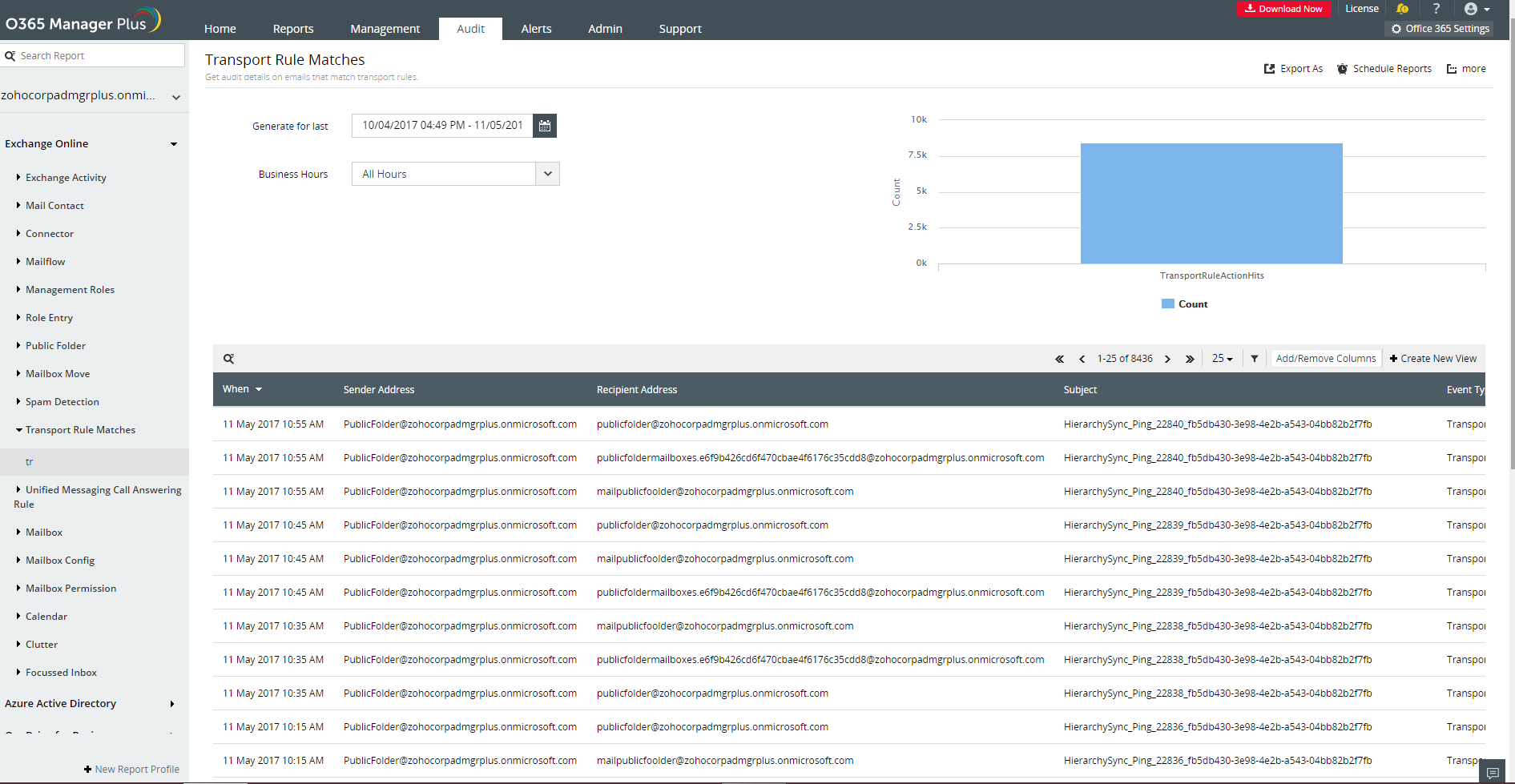
O365 Manager Plus provides, Transport Rule Match audit report that gives you audit details
on messages filtered by transport rules. With this report you can get information on,
- Sender of the email
- Recipient of the email
- Direction (inbound/outbound)
- Subject of the email
- Transport rule that filtered the email, and more.
Benefits of this report
1. Find out the users sending spam emails within your organization and make sure they adhere to
your email policy.
2. You will get to know the senders of spam emails so that, emails from them can be blocked
permanently using spam filter rules.
3. Sending spam emails is hardly accidental. They might have malicious content that can be a
threat to your system. You can identify and block such emails thereby reducing the risk imposed
by them.
To know more about Office 365 auditing by O365 Manager Plus, click here.