[KB] Delegation made easy with virtual tenants
What are virtual tenants?
O365 Manager Plus' concept of virtual tenants is segmenting users based on domain, group membership, job location, and other user attributes for administrative requirements. Administrators can create virtual tenants pertaining to a specific department, team, project, and every possible user group, and delegate management operations on them to technicians.
Important points to consider
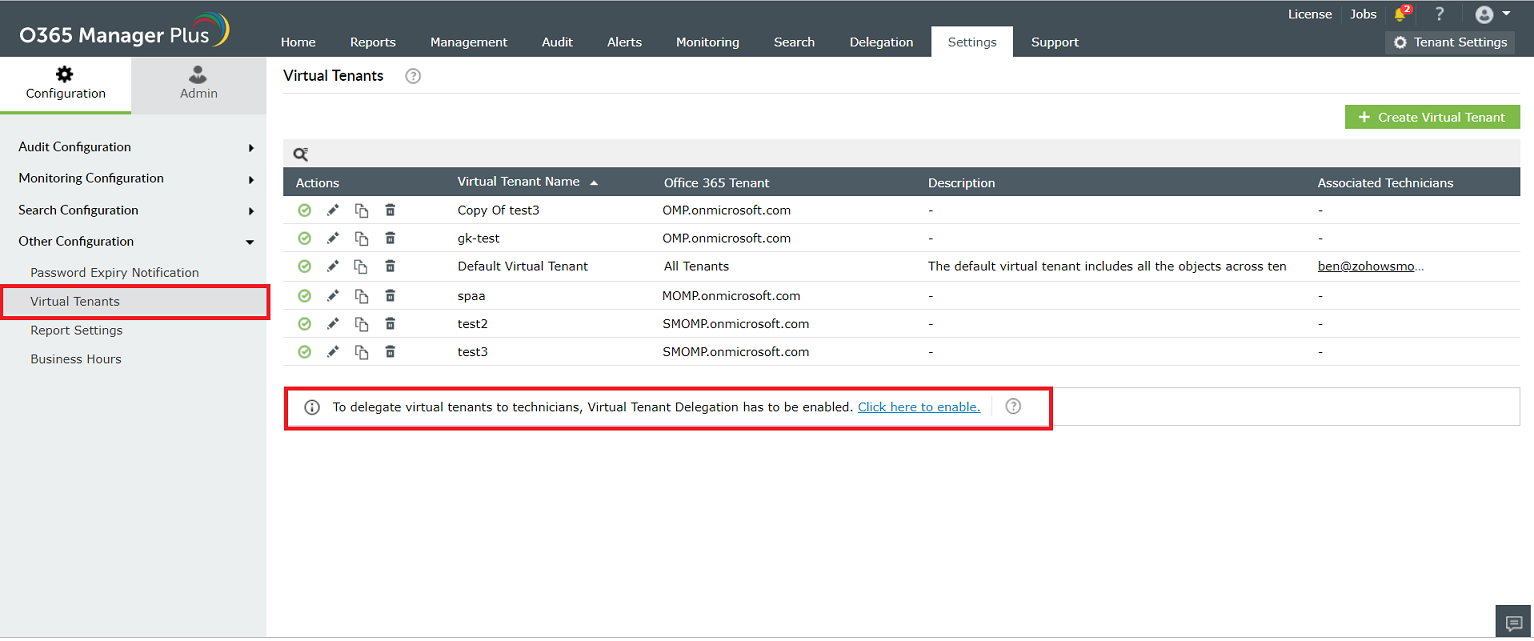
Before you begin, you need to remember that, once enabled, virtual tenant delegation cannot be disabled, and the option to delegate domains to technicians will no longer be available. In which case, admins have to create new virtual tenants with domains added to them, and delegate those virtual tenants instead of directly delegating the domains.
Refer the image below to know where to find the option to enable virtual tenant delegation.
Steps to create virtual tenants
- Go to the Settings tab.
- Navigate to Configuration > Other Configuration > Virtual Tenants
- Click on Create Virtual Tenant.
- Provide a name for the virtual tenant to be created, and choose the Office 365 tenant in which it must be created.
- In the Filter by section, set the below condition, based on which the users should be filtered. Use the + option to set multiple conditions.

- Note: Use the below condition to create virtual tenants with domains.

- In the third text box add domains using the + option.
- Click Save
Steps to delegate virtual tenants to technicians
- Go to the Delegation tab.
- Select Help Desk Delegation > Help Desk Technician in the left pane.
- Select Edit Technician in the Actions column corresponding to the technician you want to edit.
- In the Delegates To section, select the virtual tenant to be delegated from the drop-down.
- Click Save Changes.
Note: Refer
this document to know how to create a help desk technician.
Sticky Posts
[ManageEngine] Free workshop series on O365 Manager Plus
Hi there, Do you find yourself struggling to manage the different Office 365 services your organization uses with just the native tools? We've got your back! O365 Manager Plus helps you audit, monitor, manage, and report on Exchange Online, Azure AD, and several other Office 365 services. Attend this free workshop series to find out how you can get the most out of O365 Manager Plus. Register now Agenda: Session Title Date & Time AnalyzeO365 Manager Plus User Conference: 2 days of extensive training
Join us for 2 days of learning and fun at our User Conference! During this conference, we will explore ways to help you make the best use of our Office 365 reporting, managing, monitoring, auditing, and alerting solution. You have the option of joining us in Sydney or in Melbourne. <<Learn more and register now>> By attending, you can learn in depth about: Gain real insight into Office 365. Office 365 auditing and compliance management. Office 365 management and help desk delegation made easy.O365 Manager Plus Free Online Webinar - Register Now!
Hello ! How sure are you in securing your Office 365 setup from sophisticated attacks? One sure shot way of defending attacks on your Office 365 platform is to use a solution that provides additional security measures which are not available natively in Office 365. Join us in our next webinar and learn how to cope with the security risks by taking advantage of O365 Manager Plus' features. Topic: Thwart Threats with O365 Manager Plus Date: November 9, 2017 Time: 2 PM EST Presenter: Anupriya[KB] Help Desk Delegation - Create Custom Help Desk Roles
Delegating mundane tasks to help desk technicians or concerned personnel reduces the burden of administrators. With Microsoft's Office 365 administrative console, it is either give access to everything or none. This is not much user-friendly, as you are not allowed to selectively delegate tasks to technicians. A HR personnel should not have access to financial reports. Similarly , front desk technician should not be allowed to add new users. When given full access, the users may knowingly or unknowinglyTrack Microsoft Teams with the all new O365 Manager Plus!
Hello Everybody! We’ve released today a new build of O365 Manager Plus - 4103. The new update supports Microsoft Teams and enhances product’s license management. What’s new? Feature: Microsoft Teams audit and alert : Two audit and alert categories have been added for Microsoft Teams. Microsoft Teams Events: Track events such as channels added, teams created, teams deleted, and users signed in to Teams. Microsoft Teams Settings Changes: Shows the details of channel changes, team changes, and organization